
How to Connect Trustindex to Your Website
Trustindex enables you to collect and display customer reviews easily on your website. Showcasing real customer experiences helps boost SEO, build trust, and increase sales. To take full advantage of Trustindex, you’ll need to connect your website to your Trustindex account.
Follow the steps below to get started:
Step-by-Step Guide to Connect Trustindex
1. Log in to Your Website Admin Area
To access your website’s admin dashboard (back-end), please ensure that you are logged into your website’s back end.
2. Navigate to the Trustindex.io Page
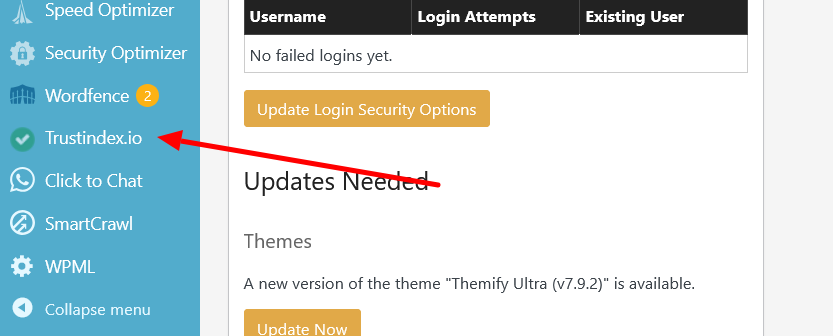
From the left-hand sidebar menu, click on “Trustindex.io”.
3. Go to the “Advanced” Tab
Once the Trustindex page loads, click on the “Advanced” tab located in the top menu.

4. Connect Your Account
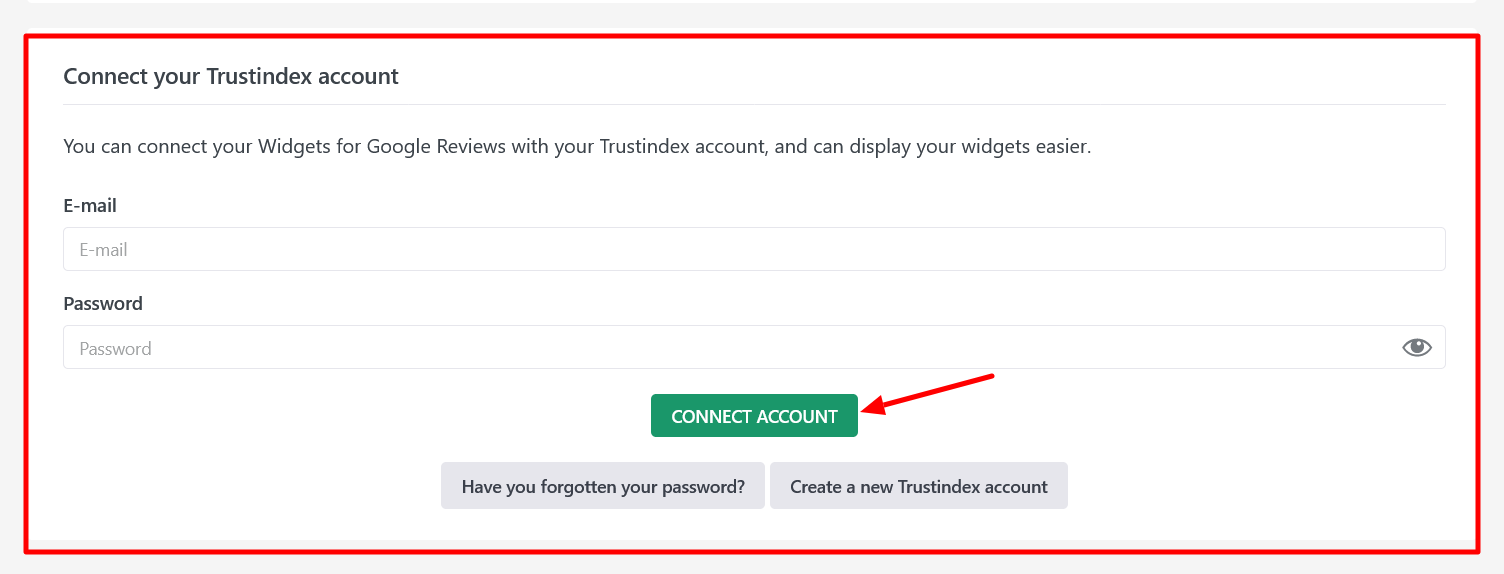
Scroll down to the “Connect your Trustindex account” section.
Enter the email address and password you used when creating your Trustindex account. Then click the “CONNECT ACCOUNT” button.
That’s it!
Your website is now connected to your Trustindex account. You can now start displaying your reviews and enhancing your site’s credibility.
If you need further help or run into any issues, feel free to contact our support team.